Adjustments
The Adjustments tab configures in-flight tuning: mapping a transmitter channel/switch to live-adjust a setting (like a PID gain or rate) without reconnecting the Configurator. Useful for fine-tuning while flying, or for A/B comparing two settings values in the air.
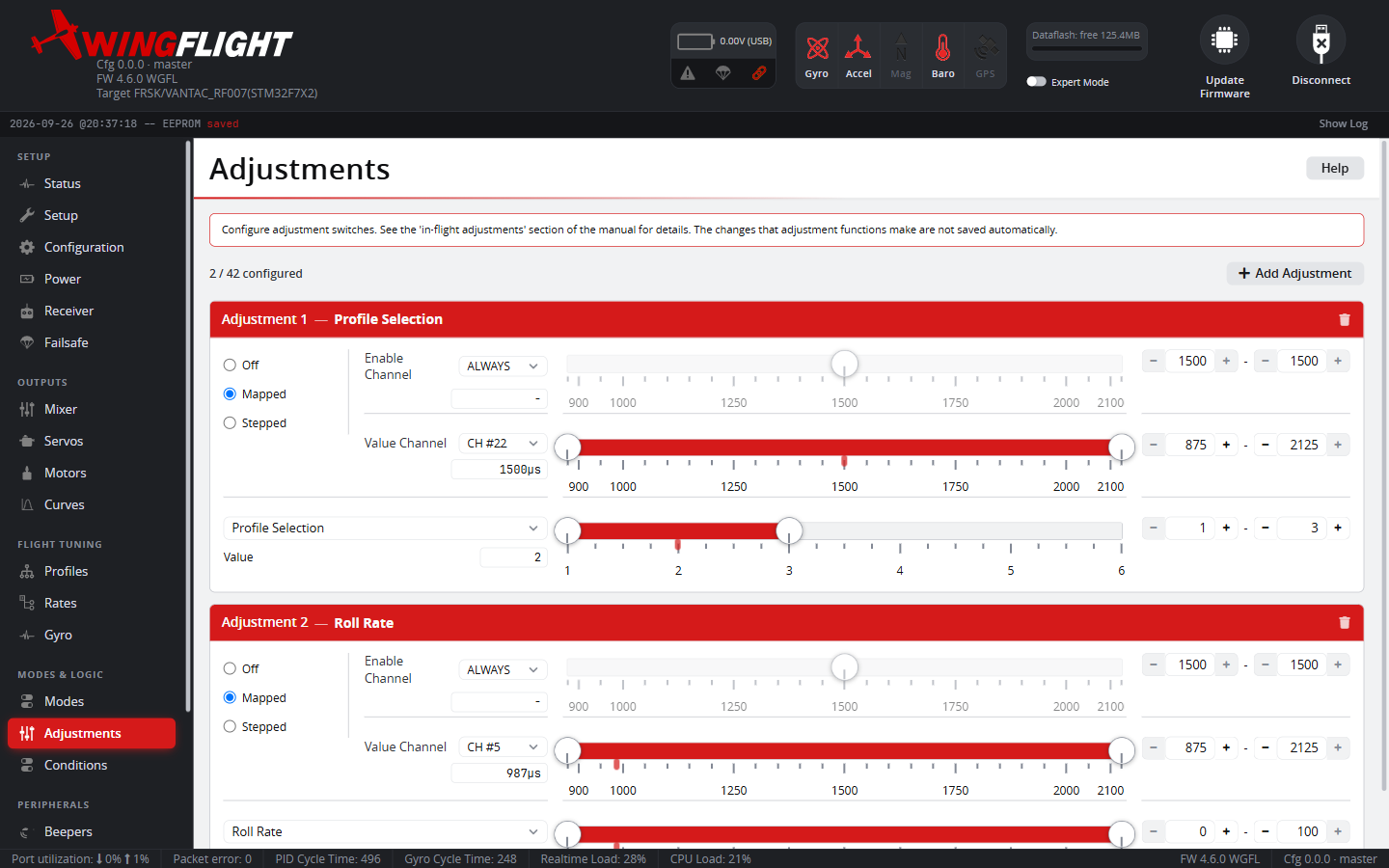
Adjustable functions are grouped by category -- Flight Feel (Master Gain, I-Term Decay and I-Term Relax), Servo Trims (roll/pitch/yaw), Accelerometer Trim, Setpoint Boost, PID/Rate/TV Profile switching, Mixer (Flap Compensation Gain, Differential Thrust Yaw Gain), and others -- and any function currently under live adjustment control shows its effective value on the owning tab while the switch/channel is active.
Profile switching (PID, Rate, and Thrust Vector) is a special case: each is its own adjustment function, mapped to a channel the same way as any other, but a profile switch applies -- and is confirmed with its own beep count -- immediately, rather than waiting for a manual value commit like most other adjustments.
Adjustments made this way aren't saved to the flight controller automatically -- they're meant for freely trying values in the air without committing to any of them. If a value you find mid-flight is worth keeping, go set it permanently (e.g. on Profiles) and Save from there.
Channel names
Every channel picker in the Configurator -- here, on Mixer, Conditions and Modes -- uses one naming scheme: CH #N, where N is the receiver channel number. The four channels after the stick channels that older versions called AUX 1-4 are now simply CH #5-8, and so on up.
Enable Channel and Value Channel
Each adjustment slot has two channels:
- Enable Channel gates whether the slot is active at all -- it only takes effect while this channel's value falls within the range you set (or set it to ALWAYS to skip gating entirely and let Value Channel control it unconditionally).
- Value Channel is read once the slot is enabled, and drives the function according to whichever mode you pick below. Its AUTO option reuses the Enable Channel itself as the value source, for the common case of one switch/knob doing both jobs.
Mapped vs. Stepped
- Mapped continuously maps the Value Channel's position across its range straight onto the function's Min/Max -- a knob or 3-position switch gives you a proportional live value, the same idea as a transmitter-side gain knob but applied on the flight controller side.
- Stepped instead treats the Value Channel like a momentary increase/decrease button: entering one sub-range nudges the value up by Step each time, the other sub-range nudges it down -- useful for a 2-position switch you flick repeatedly to walk a value up or down without needing a channel that can hold a precise proportional position.
Mapped ignores small movements of the Value Channel -- anything within about 3 µs of the position it last acted on -- so a pot that isn't perfectly still (receiver or ADC noise, or resting right on a value boundary) doesn't flip the value up and down by one step every loop, which would otherwise cause a config write, a beep and a blackbox event each time and make PID values wander. Deliberate, slow movement still gets through, because the reference only moves once that small window is exceeded. Stepped is not affected.
For Servo Trims the two modes differ in more than how you drive them: Stepped changes the servo's saved trim, one step per press, while Mapped sets a live trim that is never saved. Neither changes the servo's Mid, and both together are limited to 20% of the servo's Scale.