Failsafe
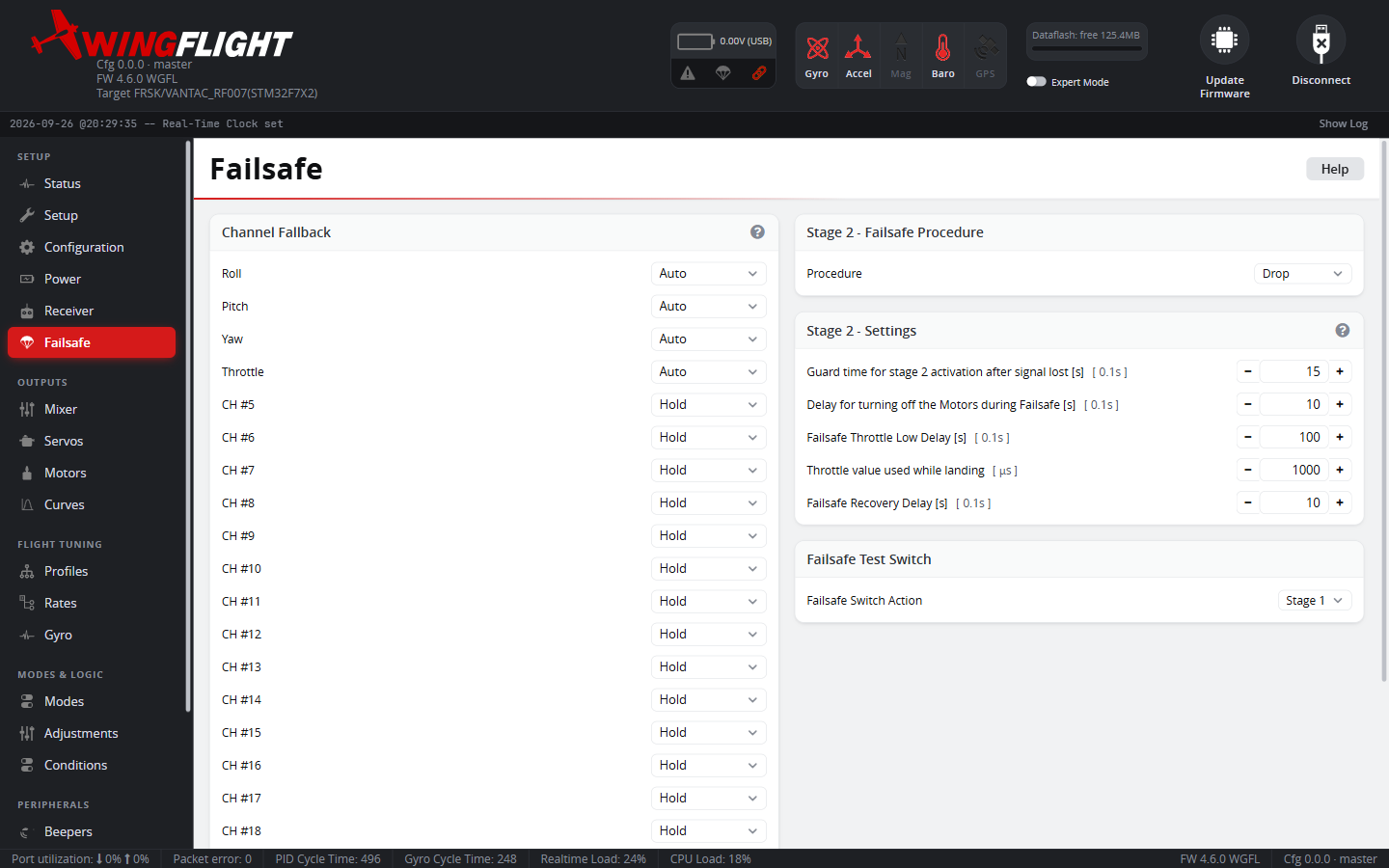
The Failsafe tab configures how the flight controller detects a lost radio link, what value each channel takes once it has, and what the aircraft does if the link stays down.
Configure and bench-test failsafe behavior before flying -- turn off your transmitter at a safe distance from the aircraft (props off) and confirm the flight controller actually enters failsafe and behaves the way you expect.
Note
If a Backup RX Input is configured, losing the main link doesn't reach any of the stages below on its own -- control switches to the backup receiver instead, within the main receiver's own ~100ms signal-loss detection window. The staged failsafe behavior described on this page only takes over if both the main link and the backup link are down.
Pulse Width Limit
Sets the valid pulse-width range (default 885-2115μs, expert mode only) -- any channel reporting a value outside it is treated as failed and enters failsafe individually, which is what actually feeds the per-channel Channel Fallback behavior below and the overall link-loss detection.
Channel Fallback
Per-channel behavior once that channel is judged failed:
- Auto drives it to a safe value automatically -- center for Roll, Pitch, Yaw; low for Throttle.
- Hold freezes it at its last known-good position.
- Set drives it to a specific value you choose.
What happens when the link is lost
- Detects the loss. No valid frame for about 100ms, a receiver failsafe flag, or a control channel outside the Pulse Width Limit counts as a bad signal.
- Holds for 300ms. Each channel keeps its last good value.
- Applies Channel Fallback. After 300ms each channel takes the value set above. With the defaults, roll, pitch and yaw go to center and throttle goes just below the off-throttle threshold. Channels set to Hold, which is the default for everything after the four stick channels, keep their last value, so an arm switch or mode switch that was on stays on.
- Runs the Stage 2 - Failsafe Procedure, below, if the link is still
down after
Guard Delay. - Blocks arming while there is no valid signal.
- Bypasses the Governor, so a governor switch held on cannot keep the motor running past what the procedure commands.
Stage 2 - Failsafe Procedure
Once Guard Delay (0.1s units, failsafe_delay) elapses with the link
still down, the flight controller takes over:
- Land and Drop both switch the aircraft to Angle-style
self-leveling immediately -- wings level, controlled pitch -- then cut the
motor and disarm after
Land Delay(failsafe_off_delay). Nothing currently distinguishes the two: neither one flares or manages descent rate, so pick either. - GPS Rescue flies the aircraft home and orbits there, using the
settings on the GPS Navigation tab -- the same
controller as GPS RTH, started
automatically. If there is no GPS fix or no home position yet, it falls
back to the same self-level-and-cut behavior as Land/Drop instead of
steering toward an unknown location. If it can't recover the link, it
also falls back to the self-level-and-cut ending, after
Land Delay.
While a procedure is running:
- Throttle is driven to the
Throttlesetting on this tab (failsafe_throttle, PWM, default 1000 = off/motor cut), not to whatever Channel Fallback set for the throttle channel. Raise it if you want the motor to keep running during GPS Rescue or a glide-assisted landing; leave it at the default for a dead-stick landing. - Control surfaces keep flying the aircraft regardless of arm state -- disarming only cuts the motor.
- If the link recovers and you bring the sticks back near center, the
flight controller hands control back to you (a brief, deliberate check,
so a flickering link doesn't hand control back and forth). Once
Recovery Delay(failsafe_recovery_delay) has passed since recovery, the procedure fully exits.
There is no altitude-managed powered landing or flare here -- once the motor is cut, it's a glide down in whatever attitude self-leveling holds.
Note
GPS Rescue flies home and orbits using the aircraft's GPS Navigation settings, on the GPS Navigation tab.
Setting up a safe failsafe
The receiver's own failsafe is still your first line of defense -- it acts faster (no ~100ms detection window) and does not depend on the flight controller's own logic:
- On your receiver or transmitter, set failsafe to throttle off (or idle for a glider) and a switch position that selects self-leveling (Angle).
- Do this at the receiver, rather than relying on the flight controller fallback alone, because auxiliary channels default to Hold.
- To make a mode switch fall back to a known position from the flight controller side, set that channel to Set with the value that selects the mode you want, or from the CLI:
rxfail 4 s 1900
rxfail <channel> <a|h|s> [value], with the channel counted from 0. a is
Auto (stick channels only), h is Hold, and s is Set.
4. Pick a Stage 2 - Failsafe Procedure and set Throttle deliberately --
the default (1000, motor off) means a dead-stick landing; raising it
means the motor keeps running through the procedure.
5. Test it: turn the transmitter off with the props off, and check the
surfaces and the motor for each procedure you might use. A receiver that
keeps sending normal-looking frames when the link is lost cannot be
detected by the flight controller.
Failsafe switch
The FAILSAFE mode on the Modes tab makes the flight
controller treat the four stick channels as invalid, which after the 300ms
hold and Guard Delay runs the same Stage 2 procedure as a real link loss.
Use it to bench-test your procedure and fallback values, or as a panic
switch, without needing to actually turn off the transmitter.
Switch Mode picks what the FAILSAFE switch does: Stage 1 runs
Channel Fallback only (as if the link were still there but the four stick
channels were invalid); Kill disarms immediately; Stage 2 runs the
full procedure above.