Arming and Stick Commands
Arming
When armed, the aircraft is ready to fly and the motor will spin when throttle is applied.
By default, arming and disarming is done with stick positions. (This is disabled when a switch is
used to arm; see the ARM mode in Modes.)
Arming disable flags
If the aircraft will not arm, open the Status tab, or connect to the CLI and run
status. The "Arming disable flags" line lists the reasons:
| Flag | Meaning |
|---|---|
NOGYRO |
No gyro detected |
RXLOSS, BADRX |
No valid receiver signal, or the arm switch was on when the receiver signal returned |
FAILSAFE, BOXFAILSAFE |
A failsafe event, or the FAILSAFE switch is on |
THROTTLE |
Throttle is not at its lowest position |
ANGLE |
The attitude estimate is not ready yet |
BOOTGRACE |
Still inside the power-on grace time |
NOPREARM |
PREARM is configured and its switch is not on |
LOAD |
The system is overloaded |
CALIB |
Sensor calibration is running |
CLI |
The CLI is active |
MSP |
Arming has been blocked over MSP (for example by the Configurator) |
GPS |
GPS Rescue or a GPS RTH switch is set up and there is no GPS fix yet. Only the first arm after power-up needs the fix. To arm without one, see Arming without a GPS fix |
RESCUE_SW |
The GPS RTH or GPS LOITER switch is on. Switch it off to arm |
NO_ACC_CAL |
The accelerometer has not been calibrated |
MOTOR_PROTO |
The motor protocol is not valid |
SETUP |
A setup tool is holding the model: the Configurator's setup wizard, or a servo or mixer override. Called OVERRIDE in firmware up to 0.0.32 |
ARMSWITCH |
Arming was attempted while another flag was set. Switch the arm switch off, and on again once the other flags clear |
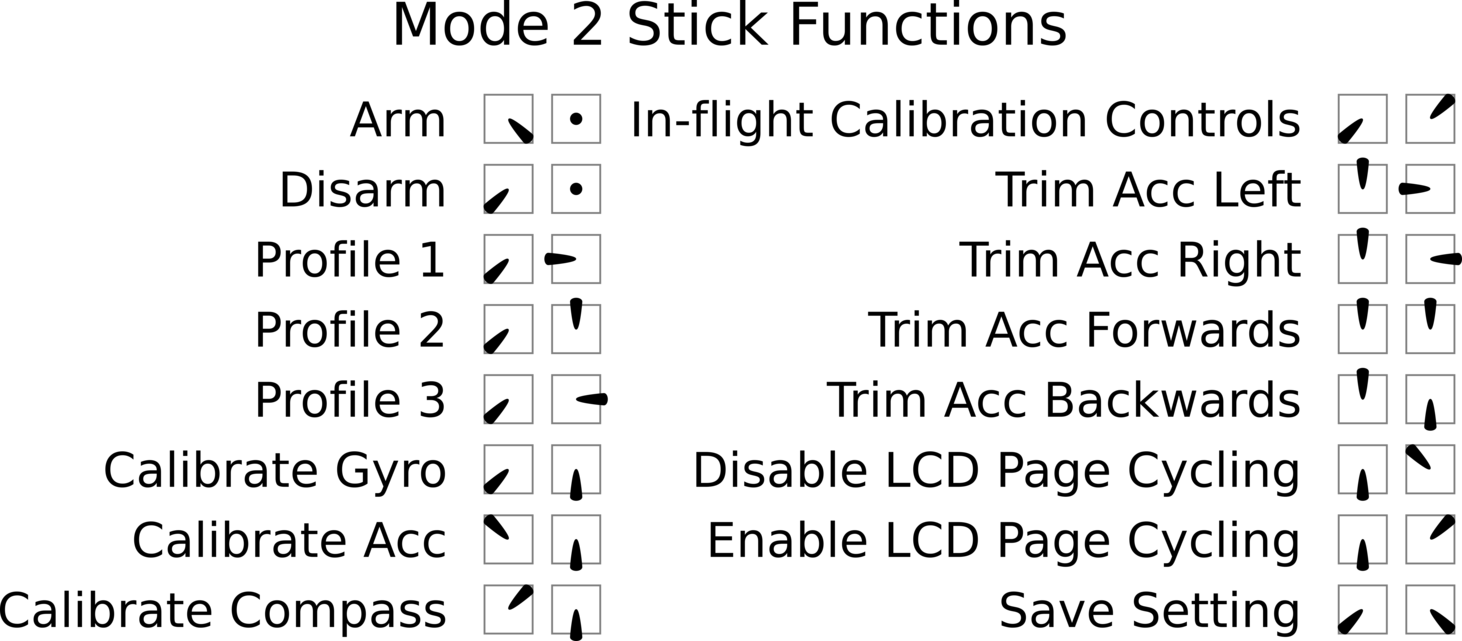
Stick commands
The three stick positions are:
| Position | Approx. channel input |
|---|---|
| LOW | 1000 |
| CENTER | 1500 |
| HIGH | 2000 |
The stick positions are combined to give these commands. They work only while disarmed, except arming and disarming.
| Function | Throttle | Yaw | Pitch | Roll |
|---|---|---|---|---|
| ARM | LOW | HIGH | CENTER | CENTER |
| DISARM | LOW | LOW | CENTER | CENTER |
| Select PID profile 1 | LOW | LOW | CENTER | LOW |
| Select PID profile 2 | LOW | LOW | HIGH | CENTER |
| Select PID profile 3 | LOW | LOW | CENTER | HIGH |
| Calibrate gyro | LOW | LOW | LOW | CENTER |
| Calibrate accelerometer | HIGH | LOW | LOW | CENTER |
| Calibrate magnetometer | HIGH | HIGH | LOW | CENTER |
| Save settings | LOW | LOW | LOW | HIGH |
| Disable display page cycling | LOW | CENTER | HIGH | LOW |
| Enable display page cycling | LOW | CENTER | HIGH | HIGH |
When ANGLE is active, throttle HIGH and yaw CENTER trims the accelerometer level reference with the sticks:
| Function | Pitch | Roll |
|---|---|---|
| Trim pitch up one step | HIGH | CENTER |
| Trim pitch down one step | LOW | CENTER |
| Trim roll right one step | CENTER | HIGH |
| Trim roll left one step | CENTER | LOW |
When neither is active (plain acro), the same throttle HIGH and yaw CENTER positions select the rate profile instead:
| Rate profile | Pitch | Roll |
|---|---|---|
| 1 | HIGH | CENTER |
| 2 | LOW | CENTER |
| 3 | CENTER | HIGH |
| 4 | CENTER | LOW |
History
The initial stick commands came from MultiWii. The original documents can be found at https://code.google.com/archive/p/multiwii/source/default/source.