Power
The Power tab configures battery voltage and current monitoring: cell count detection/limits, voltage divider scaling, and current sensor scaling if fitted.
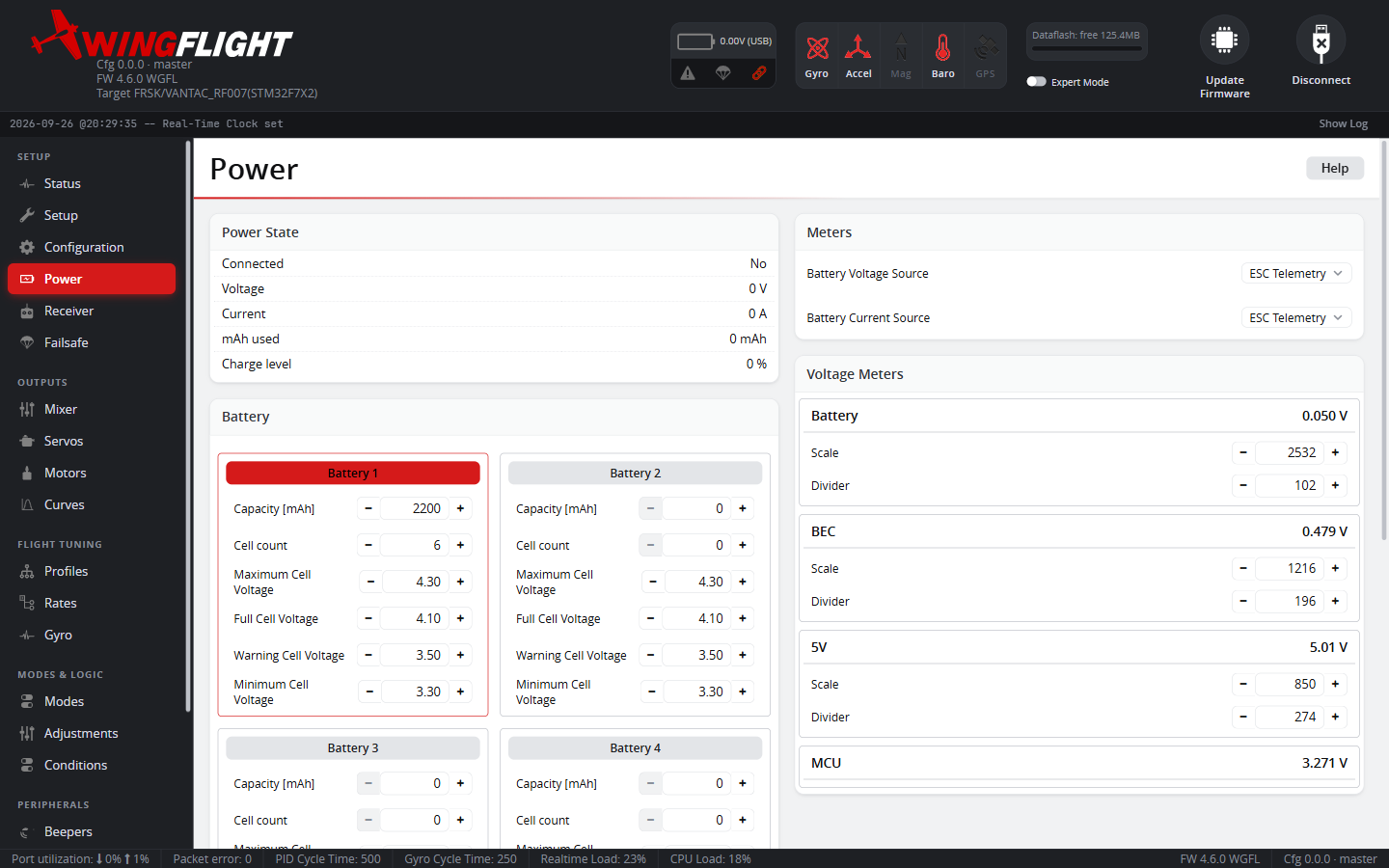
Accurate voltage readings here feed the low-voltage warnings/beeper and any battery-based failsafe behavior, so it's worth calibrating against a real multimeter reading rather than trusting default scale values.
Meter source
Voltage and current can each be read from Battery ADC (the board's own onboard voltage divider / current shunt), ESC Telemetry, a FrSky Sensor, or a CRSF Sensor -- or left None if not fitted. Only ADC sources need the Scale and Divider fields below calibrated for your hardware; the other sources already report a computed value, so there's nothing to scale. Changing the source itself needs a reboot to remap hardware pins -- the rest of this tab applies live.
CRSF Sensor needs a UART assigned the CRSF Sensors port function first -- see the CRSF Sensors tab, including which decoded frame type actually feeds the voltage reading when more than one is present.
Battery profiles
There are six battery profiles, and each one carries its own capacity, cell count and Min / Warn / Full / Max cell voltages. This lets one model switch between, for example, a 3S LiPo and a 4S LiHV pack. Click a profile's name to make it the active profile; the active row is highlighted.
A cell count of 0 detects the cell count automatically when the battery is connected. Within each profile the voltages must be ordered Min ≤ Warn ≤ Full ≤ Max -- a profile that is not ordered is reset to the defaults when the configuration is loaded.
Battery monitoring, the low-voltage warnings and SmartFuel all use the active profile. If the profile is changed while armed (for example with an adjustment), the change is applied as soon as the model is disarmed.
Firmware that predates per-profile cell settings shows the older layout: a single set of cell count and cell voltages shared by all profiles, with only the capacity set per profile.
Calibration Manager
Rather than computing a voltage divider or current-shunt scale by hand, plug in a battery (props off!), measure its actual voltage/current with a multimeter, and type those true values into the Calibration Manager -- it back-computes the corrected Scale for you from the difference between what it's currently reading and what you measured. Only available for ADC meter sources, and only meaningful if the Divider/Offset fields are already roughly right first (leaving a value at 0 skips calibrating it).
SmartFuel
A fuel-gauge charge estimate, more informative than raw voltage alone: Voltage mode estimates remaining charge from pack voltage, Current mode integrates measured mAh drawn against the configured battery capacity, and Combined reports whichever of the two is more pessimistic at any given moment (so an optimistic voltage reading under load can't mask a pack that's actually further depleted). New configurations default to Current. Until mAh used and the pack capacity are both known, Current mode uses the voltage estimate instead, so it also works without a current sensor. Every mode needs a battery voltage source; SmartFuel stays inactive until one is set. Voltage Drop Rate and Charge Drop Rate cap how fast the voltage-based estimate is allowed to fall, and Sag Gain compensates for voltage sag under load -- raise it if SmartFuel reads too pessimistic under load, lower it if too optimistic. Sag Gain is entered in volts per cell at full throttle (0.40 V by default), and the compensation follows the motor output, so a model with no motor gets none.