Rates
The Rates tab configures stick response: how far/fast the aircraft responds to full stick deflection, and how much expo is applied near center for smoother fine control.
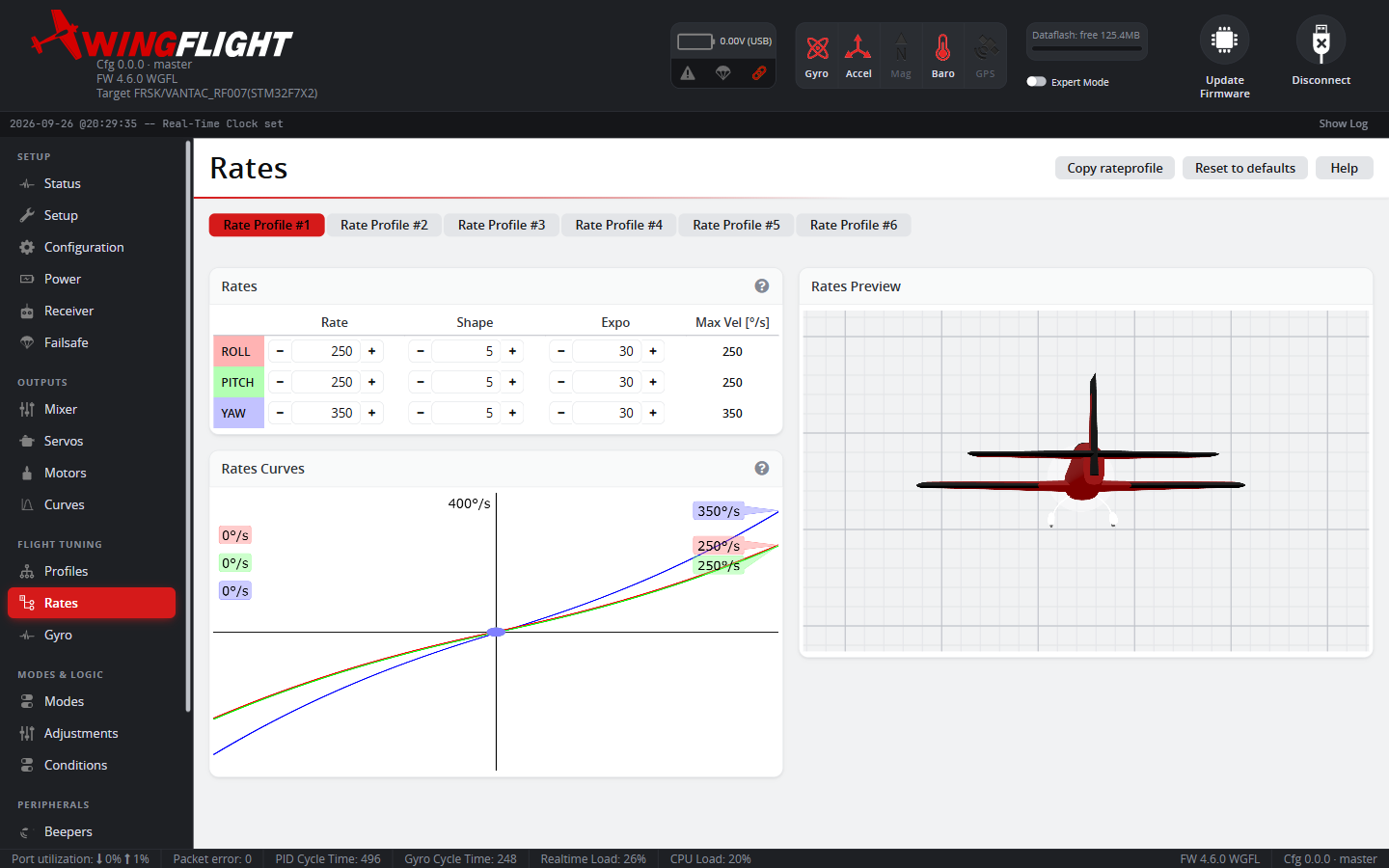
Rates are independent of PID tuning (Profiles) -- rates shape stick input, while profiles control how well the aircraft tracks whatever attitude that input commands.
Like PID profiles, up to six rate profiles can be stored and switched between from the profile tabs at the top of the page, and copied from one to another -- the live curve chart and 3D preview update immediately so you can compare a change before committing to it.
Rate, Shape, and Expo
Each axis (Roll, Pitch, Yaw) has three values, and it's worth knowing exactly what each one changes, because two of them interact in a way that's easy to get backwards:
- Rate sets your top speed -- the rotation rate, in °/s, you get at full stick deflection. It's shown directly in the Max Vel column, and it's the only one of the three that changes it. Raise it for a faster, more aerobatic top end; lower it for a calmer ceiling on how fast the aircraft can rotate no matter how hard you throw the stick.
- Expo softens the response right around center, for finer small corrections, without touching your top speed. At 0% Expo, the response is a dead straight line from center to max. Raising Expo bends more of the stick's throw into that straight line's shadow near center (gentler small inputs) while still reaching the same Max Vel at full deflection.
- Shape sets how sharply the curve bends within that softened region -- in other words, how much of the rate increase is saved up for the last part of the stick throw versus spread evenly across it. Critically, Shape only does anything if Expo is above 0% -- at 0% Expo the curve is a straight line and Shape has no effect at all, since there's no curve left for it to shape.
Quick troubleshooting
| What you're seeing in the air | Try |
|---|---|
| Not enough punch, too slow to snap into a hard maneuver at full stick | Raise Rate |
| Uncontrollable/overshoots on big stick inputs, feels dangerous at full deflection | Lower Rate |
| Small corrections near center feel too sensitive or nervous | Raise Expo |
| Feels numb/dead right around center, hard to make fine corrections | Lower Expo |
| Response feels flat/linear the whole way, no extra "kick" out near the stick ends | Raise Shape |
| Changing Shape doesn't seem to do anything | Check Expo isn't at 0% -- Shape has no effect there |
Dynamics (expert mode)
A few extra per-axis shaping options live under Dynamics, hidden unless expert mode is on:
- Response Time smooths the raw stick input itself before it becomes a setpoint -- larger values add more smoothing (and more perceived lag), 0 disables it. Useful for a twitchy transmitter/stick or a deliberately softer, more scale-like feel.
- Setpoint Boost Gain/Cutoff sharpens the raw stick input for a snappier feel, boosting it based on how fast the stick itself is moving. This is a different mechanism from the B (Boost) column in PID Gains -- this one reshapes the stick signal itself, per rate profile, before it ever reaches the PID loop, rather than boosting Feedforward inside the PID loop.
- Dynamic Ceiling Gain (Yaw) reduces how much stick travel is needed to reach max yaw rate while the stick is moving rapidly toward full deflection -- useful for making a fast full-stick yaw flick reliably hit max rate.
- Dynamic Deadband Gain/Filter (Yaw) temporarily widens the yaw deadband while the stick is moving rapidly back through center, to smooth out an unwanted wobble on a fast-centering yaw input.