Mixer
The Mixer tab defines how virtual control axes (roll, pitch, yaw, throttle) map onto your aircraft's actual control surfaces and motor(s) -- the core of what makes WingFlight a fixed-wing mixer rather than a helicopter swashplate mixer.
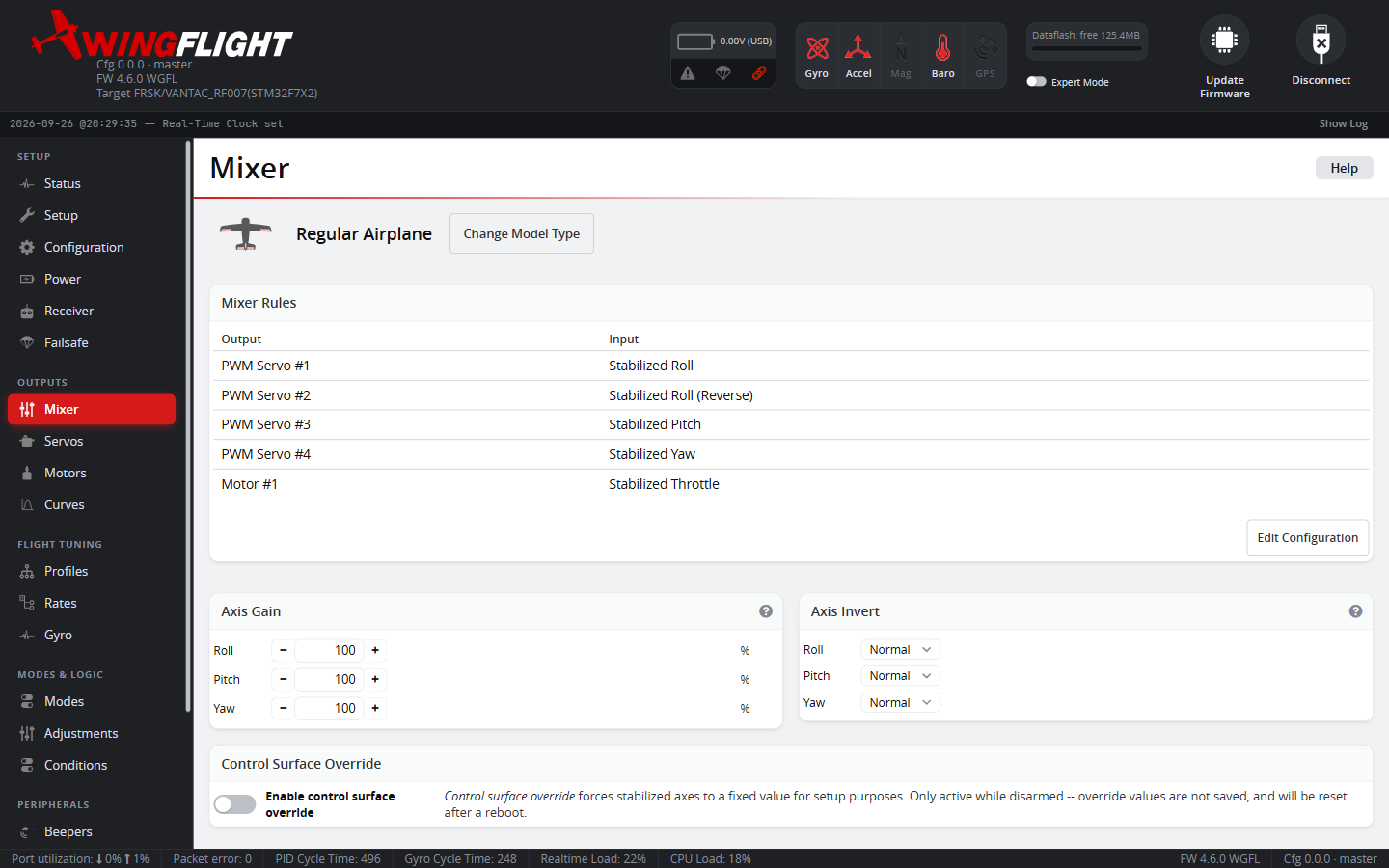
Typical fixed-wing mixer setups include conventional aileron/elevator/rudder layouts, flying wings (elevon mixing), V-tails, and multi-motor configurations. The Mixer Setup Wizard builds a starting rule set from a few questions (wing layout, aileron count, tail type) -- a much faster start than building rules from scratch, and a good way to see a working example of the patterns below.
If your airframe changes (e.g. converting ailerons to flaperons, or adding a second motor), this is the tab to revisit.
If you're running digital bus servos (SBUS/FBUS output) instead of, or alongside, PWM servos, note that they normally mirror your PWM outputs automatically -- rules built here for PWM outputs drive both. See Servos → Bus Servos for how that works and when to turn it off.
Rules
Each rule reads one input (a stabilized axis, throttle, an RC channel, etc.) and writes it to one output (a servo or motor), combined with whatever's already on that output via an Operator:
- Set overwrites the output outright.
- Add sums onto whatever's already there.
- Mul multiplies whatever's already there.
Rules run top to bottom in list order, so this matters: the first rule for a given output should normally be Set (it establishes the baseline), and any later rule for that same output should normally be Add (layering more input on top) -- a later Set silently wipes out everything earlier rules wrote to that output, which is rarely what you want. The Configurator flags both cases inline so a misordered rule set doesn't quietly go unnoticed. This is exactly the pattern behind e.g. elevon mixing: Pitch is Set on the elevon servo, then Roll is Added on top of it.
Other per-rule fields:
- Weight (0-5000) is how strongly this rule's input drives the output -- values above 1000 amplify the input rather than just passing it through.
- Differential (-100% to 100%) suppresses (positive) or boosts (negative) the negative-deflection side of this rule relative to the positive side -- the classic aileron-differential trick of reducing down-aileron throw to cut adverse yaw, without touching the input source itself.
- Offset (-2500 to 2500) adds a fixed bias to the output, independent of the input's value.
- Speed (0-60000) limits how fast this rule's output can move, for a slower/softer mechanical response on a specific surface.
- Curve assigns a reshaping curve from the Curves tab to this rule's input before it's weighted onto the output.
- Condition gates the rule on a condition from the Conditions tab -- while false, the rule doesn't apply, and its row dims in the table so it's obvious at a glance which rules are actually contributing right now.
- The rule's Input can be a stabilized axis, throttle, or an RC channel, named CH #N like every other channel picker in the Configurator. The Roll, Pitch, Yaw and Throttle bypass inputs (the raw stick, without stabilization) resolve to whichever receiver channel you've actually mapped to that stick on the Receiver tab, not to a fixed channel order.
- Role tags a rule with a recognized job in the mix -- see Rule Roles below.
Rule Roles
Most rules are just an ordinary axis-to-surface mapping, unique to your airframe and identified by where they sit in the list. A few jobs are common enough, and important enough to find again later, that they get a Role instead: a label on the rule itself, independent of its position in the list. Right now that's flap-to-elevator compensation and differential-thrust yaw (below), both tagged automatically by the Mixer Setup Wizard when you enable them.
A rule's Role changes nothing about how it runs -- the mixer itself never reads it. A role-tagged rule keeps its own Reverse setting no matter what an Adjustment does to it: a live adjustment is a signed scale on top of each tagged rule's own configured direction, not a replacement for it. Positive values behave as the Weight and Reverse you set. A negative value flips every tagged rule together, so a model that needs the compensation the opposite way can get it without editing each rule, the two differential-thrust rules stay opposite each other, and same-signed flap-compensation rules on a V-tail or flying wing keep their relative polarity. What it unlocks is everything around the rule:
- Any model type other than Custom shows a Compensation table listing just the tagged rules' weights, so tuning one doesn't require opening the full rule list.
- The Adjustments tab can drive a tagged rule's weight live from a transmitter switch or pot, and keeps working no matter where the rule ends up if you reorder the list later.
Flaps and Flaperons
Turn on Flaps in the Mixer Setup Wizard to drive flaps from channel 5 (AUX1), and choose how they're fitted:
- 1 servo (shared Y-cable channel) or 2 independent servos add flap servos after the other surfaces.
- No flap servos -- the ailerons droop as flaps (flaperons) adds no servos. Both ailerons droop together on the flap channel, on top of their normal roll travel. It's only offered with independent ailerons, since each aileron needs its own servo.
Flaperons use the same channel as flap servos: centre is neutral, and the ailerons droop as the channel moves one way and rise as it moves the other. The wizard starts the droop at half the aileron's travel, which leaves room for roll with the flaps fully down. Set the aileron directions in the Setup Wizard or on the Servos tab first; the flaperon rules then droop both ailerons the same way without any reversing of their own.
Full flap plus full roll moves the down-going aileron furthest, so check it doesn't hit its servo limit. The Setup Wizard's travel step counts the flaps when it checks this.
ExpressLRS
Flaps and flaperons need channel 5 as a full-resolution channel. With ExpressLRS, set the switch mode to Full Res 16ch Rate/2 (100Hz Full or 333Hz Full packet rate). In the other switch modes channel 5 is only a two-position arm switch. See Receiver → ExpressLRS switch mode.
Flap-to-Elevator Compensation
Many airframes pitch when flaps go down -- often a nose-up "balloon," sometimes the opposite. If you don't correct for it, the stabilizer will quietly paper over a small version of this for you, which can hide the problem during most of the flight. But that hidden correction has limits, and it tends to run out right on landing approach when you're slow and low -- the plane can suddenly pitch up (or down) on you during the flare, with no warning it was coming.
The fix is to cancel the pitch change yourself, right in the mixer, so the elevator moves with the flaps automatically. If you enabled Flaps in the Mixer Setup Wizard (with flap servos or flaperons), this is already set up for you: the wizard adds a Flap Compensation-tagged rule, at zero weight, onto every surface that carries pitch -- the elevator, or both sides of a V-tail or elevon layout. Find it in the Compensation table (or the rule list itself in Custom mode) and raise Weight until putting the flaps down no longer causes any pitch change with the stick centered. If the pitch change isn't even across flap travel (common with multi-stage flaps), assign a Curve to the rule instead of relying on Weight alone.
Building the rule by hand works the same way if you're not using the wizard, or need a second one:
- Find the rule that drives your elevator servo from Stabilized Pitch -- this should already exist as a Set rule.
- Add a new rule below it, on the same output, reading whatever input drives your flaps (an RC channel, or the same input your flap rule uses). Set its Operator to Add, and its Role to Flap Compensation if you'd like it to appear in the Compensation table or be adjustable in flight (see below).
- Adjust Weight (and Reverse if it moves the wrong way) until putting the flaps down no longer causes any pitch change with the stick centered.
- If the pitch change isn't even across flap travel, assign a Curve to the rule instead.
Do this after you've already trimmed the plane for normal cruise flight (via Auto Trim or the Servos tab's Trim column) -- this rule is just for the extra pitch change flaps cause, not a replacement for trimming the airframe itself.
Once tagged, the rule's Weight can also be mapped to a transmitter switch or pot on the Adjustments tab (Flap Compensation Gain) -- handy for dialing it in during a flight, or adjusting for a payload or CG change without reconnecting the Configurator.
Differential Thrust Yaw
On a twin-motor airframe, the Mixer Setup Wizard's Differential Thrust option adds extra yaw authority by speeding up one motor and slowing the other, on top of normal throttle -- handy on a rudderless twin, or as extra authority alongside a rudder you already have. Both rules it generates share the Differential Thrust Yaw role but move opposite directions by design, so raising Differential Thrust Yaw Gain on the Adjustments tab (or the Weight field on either rule) scales both together rather than cancelling the differential out.
Axis Throw / Invert
Axis Throw scales every rule reading a given stabilized axis (Roll, Pitch, Yaw) by one percentage (0-200%, 100% = the servo's normal travel) -- raise or lower the combined throw of every surface on that axis (e.g. both aileron servos) without re-balancing each rule's Weight individually. Axis Invert flips every rule reading that axis at once, instead of editing each rule's Reverse checkbox by hand.
Pair Axis Throw with Control Surface Override below it to calibrate an exact throw: enable the override for an axis, command a known percentage (e.g. 100%), measure the actual surface deflection with a protractor, then adjust that axis's Throw until the measured angle matches your target. Override only takes effect while disarmed.